 Navigation
 Home
Home
 About Me
 Projects
 Blog
Blog
 Actions
 Go Back
 Top of Page

 Onapookkalam / ഓണപ്പൂക്കളം - DFIR report
 Posted: 2025-06-25 |
 Author: Siddharth |
 Category: CTF
Onapookkalam Challenge Writeup
Challenge Overview
While preparing for Onapookkalam, notes were recorded on a mobile device. The phone was suspected to be tampered with, potentially having data modified or deleted.
Objectives: - Note Retrieval: Extract specific information from saved notes (flagPart1) - Database Analysis: Identify a specific string that was modified and deleted from Realm DB (flagPart2)
Required Output Format:
flag{flagPart1_flagPart2}
---
Investigation Process
Initial File Extraction
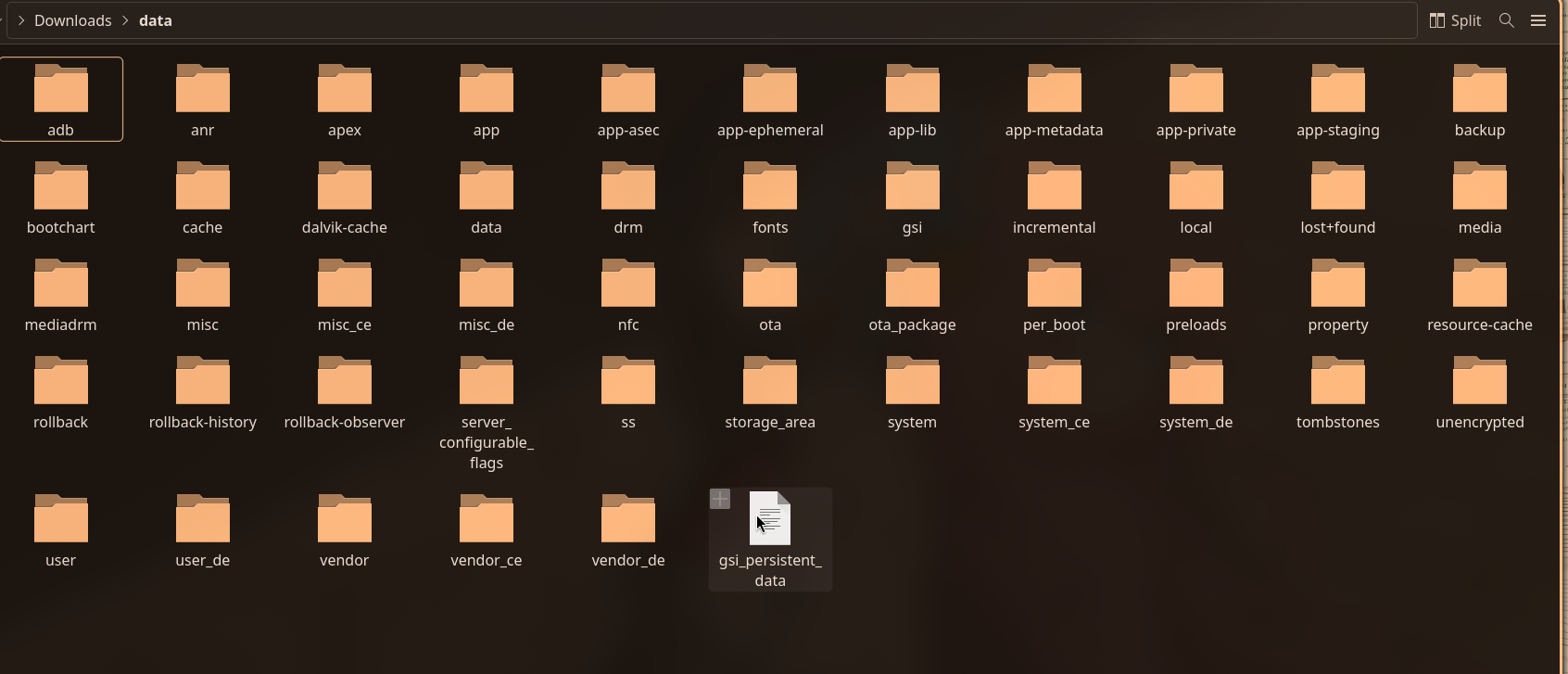
After extraction, numerous files were discovered:
Notes Recovery
The challenge focused on recovering notes. Lets start by searching for notes ?
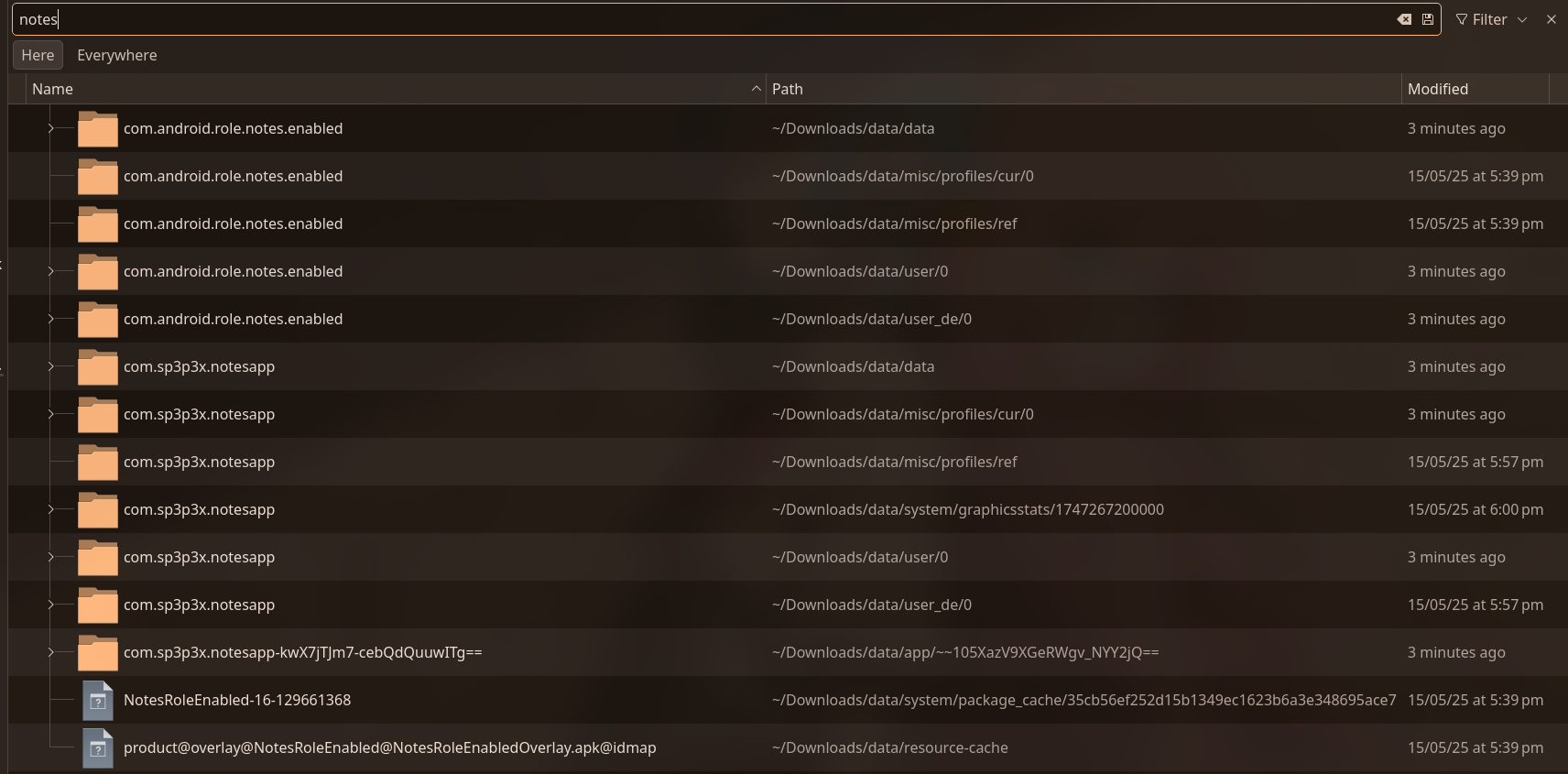
This directory contained the following files:

Flutter App Analysis
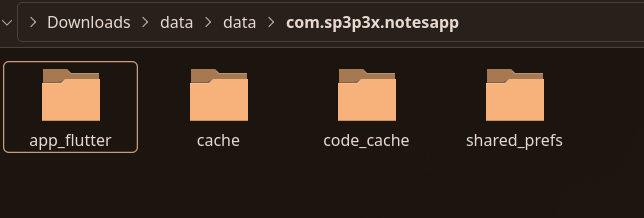
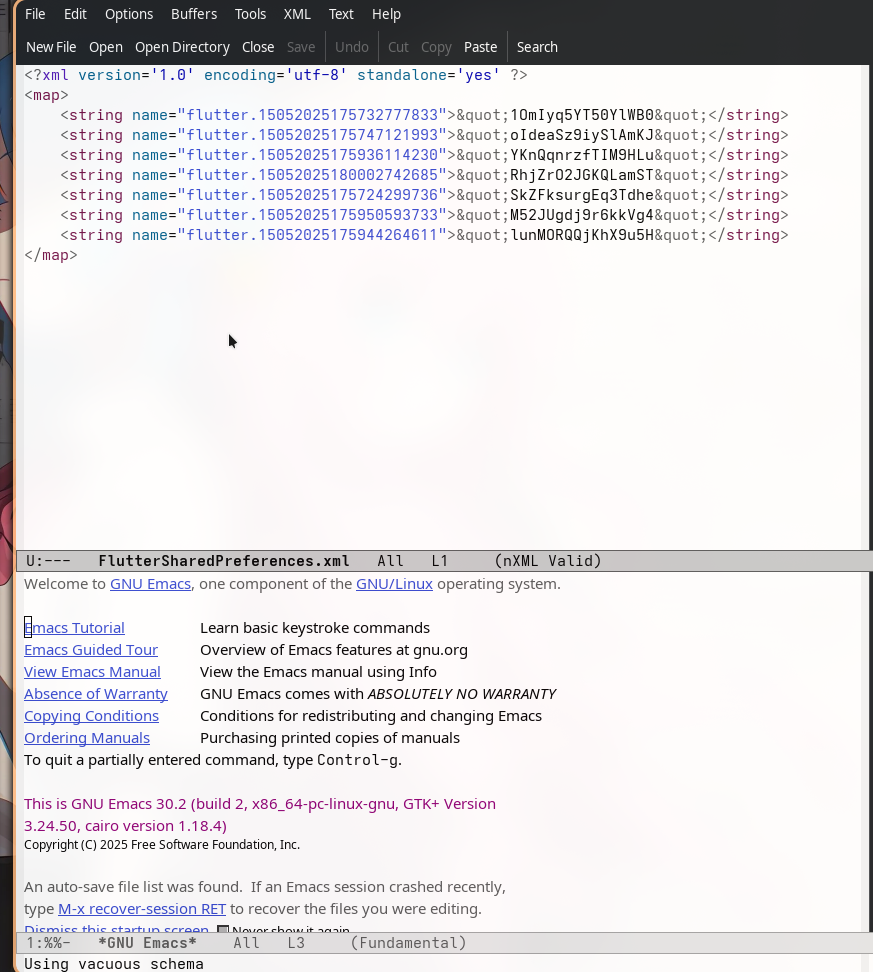
So after poking it for some time revealed this was about recovering data from a Flutter app:
Source Code Discovery
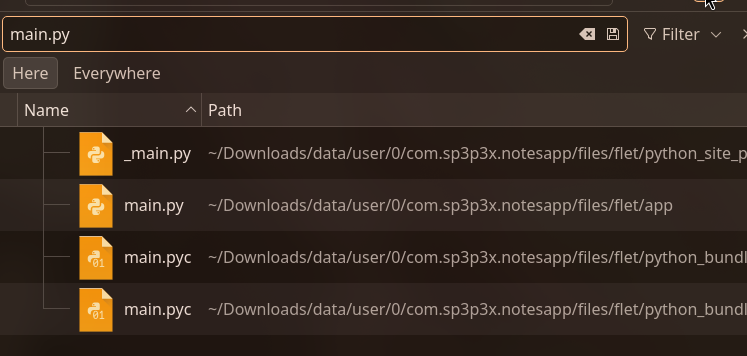
Since Flutter uses Python (via Flet framework), i searched for Python files containing the APK logic. The main application file was found:
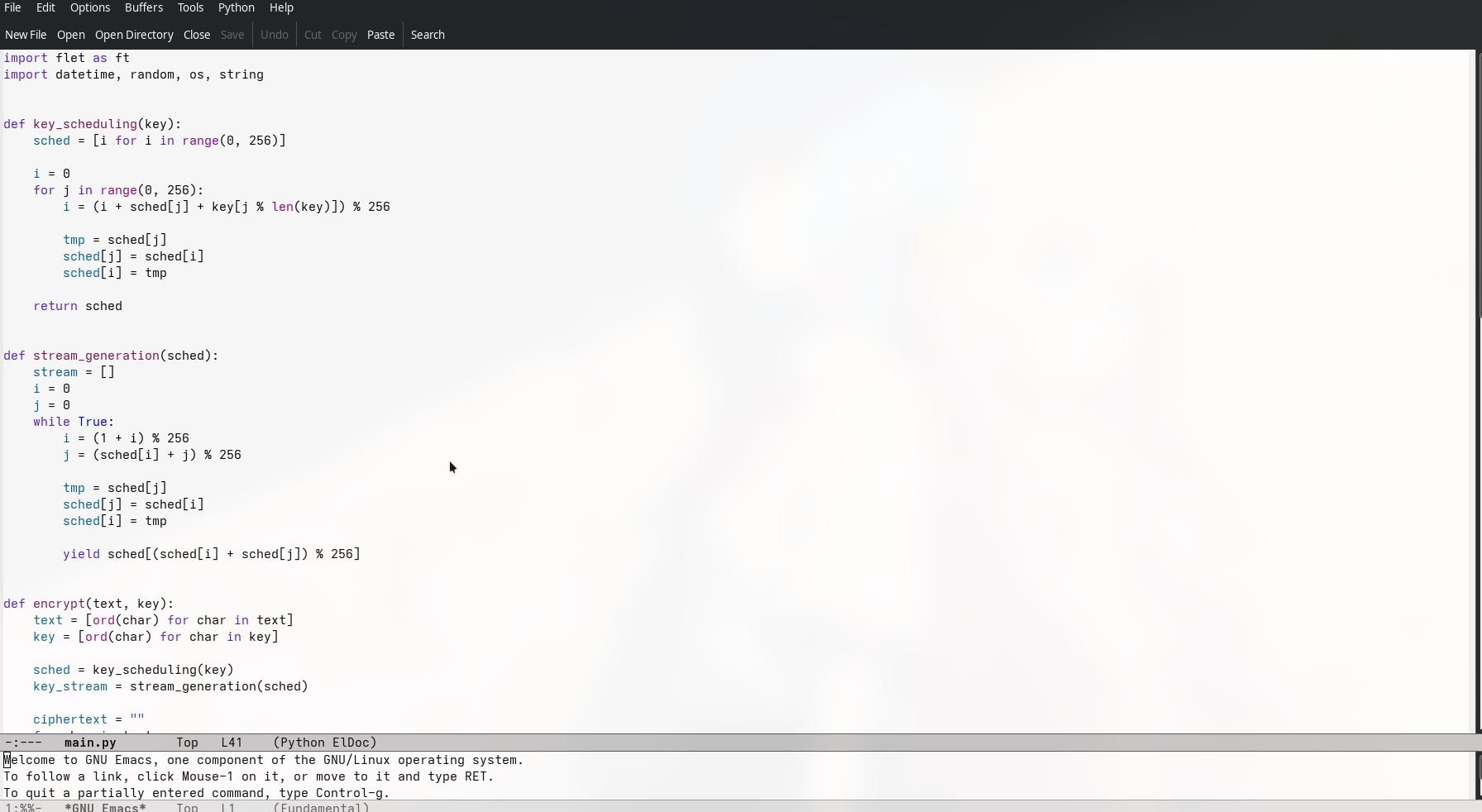
Encryption Implementation
This Python code reveales the notes app's encryption scheme:
import flet as ft
import datetime, random, os, string

def key_scheduling(key):
    sched = [i for i in range(0, 256)]
    i = 0
    for j in range(0, 256):
        i = (i + sched[j] + key[j % len(key)]) % 256
        tmp = sched[j]
        sched[j] = sched[i]
        sched[i] = tmp
    return sched

def stream_generation(sched):
    stream = []
    i = 0
    j = 0
    while True:
        i = (1 + i) % 256
        j = (sched[i] + j) % 256
        tmp = sched[j]
        sched[j] = sched[i]
        sched[i] = tmp
        yield sched[(sched[i] + sched[j]) % 256]

def encrypt(text, key):
    text = [ord(char) for char in text]
    key = [ord(char) for char in key]
    sched = key_scheduling(key)
    key_stream = stream_generation(sched)
    ciphertext = ""
    for char in text:
        enc = str(hex(char ^ next(key_stream))).lower()
        ciphertext += enc
    return ciphertext

def storeData(page, content):
    app_data_path = os.getenv("FLET_APP_STORAGE_DATA")
    fileName = f"{datetime.datetime.now().strftime("%d%m%Y%H%M%S%f")}"
    my_file_path = os.path.join(app_data_path, fileName)
    key = "".join(
        random.choice(string.ascii_letters + string.digits) for _ in range(16)
    )
    encText = encrypt(content, key)
    page.client_storage.set(fileName, key)
    with open(my_file_path, "w") as f:
        f.write(encText)
    page.open(ft.SnackBar(ft.Text(f"File saved to App Data Storage!")))

def main(page: ft.Page):
    def saveNote(e):
        data = inputBox.value
        if data != "":
            storeData(page, data)
        else:
            page.open(ft.SnackBar(ft.Text("Empty content!")))

    appBar = ft.AppBar(title=ft.Text("Notes App"))
    inputBox = ft.TextField(hint_text="Enter some text...", multiline=True, min_lines=3)
    page.appbar = appBar
    page.add(inputBox)
    page.add(
        ft.ElevatedButton(text="Save Note", on_click=saveNote, style=ft.ButtonStyle())
    )

ft.app(main)
So ildr - the application allows users to create and save encrypted notes with the following workflow: When a user enters text and clicks "Save Note", the application generates a unique filename based on the current timestamp (format: DDMMYYYYHHMMSSμs). It then creates a random 16-character encryption key consisting of letters and digits. The note content is encrypted using a custom implementation of the RC4 stream cipher algorithm, which involves two main phases: key scheduling (which initializes a 256-byte state array based on the encryption key) and stream generation (which produces a pseudo-random keystream). The encryption process XORs each character of the plaintext with the corresponding keystream byte and converts the result to hexadecimal format. The encrypted text is stored in a file within the app's data directory, while the encryption key is separately stored in the client storage using the filename as the identifier. This design means that to decrypt any saved note, you need both the encrypted file and its corresponding encryption key from the client storage, making the encryption key essential for data recovery.
so I wrote a Python script that: 1. Implemented the RC4 decryption algorithm (mirroring the encryption code) 2. Parsed the hex-encoded ciphertext 3. XORed each byte with the keystream to recover plaintext
#!/usr/bin/env python3
"""Simple decryption script for the notes challenge"""

import os

def key_scheduling(key):
    sched = [i for i in range(0, 256)]
    i = 0
    for j in range(0, 256):
        i = (i + sched[j] + key[j % len(key)]) % 256
        tmp = sched[j]
        sched[j] = sched[i]
        sched[i] = tmp
    return sched

def stream_generation(sched):
    i = 0
    j = 0
    while True:
        i = (1 + i) % 256
        j = (sched[i] + j) % 256
        tmp = sched[j]
        sched[j] = sched[i]
        sched[i] = tmp
        yield sched[(sched[i] + sched[j]) % 256]

def decrypt(ciphertext, key):
    key = [ord(char) for char in key]
    sched = key_scheduling(key)
    key_stream = stream_generation(sched)

    # Parse hex values from format: 0xXX0xYY0xZZ...
    hex_values = []
    i = 0
    while i < len(ciphertext):
        if ciphertext[i:i+2] == '0x':
            j = i + 2
            while j < len(ciphertext) and ciphertext[j:j+2] != '0x':
                j += 1
            hex_val = ciphertext[i:j]
            hex_values.append(int(hex_val, 16))
            i = j
        else:
            i += 1

    plaintext = ""
    for encrypted_byte in hex_values:
        decrypted_byte = encrypted_byte ^ next(key_stream)
        plaintext += chr(decrypted_byte)

    return plaintext

# Keys from client storage
KEYS = {
    "15052025175732777833": "1OmIyq5YT50YlWB0",
    "15052025175747121993": "oIdeaSz9iySlAmKJ",
    "15052025175936114230": "YKnQqnrzfTIM9HLu",
    "15052025180002742685": "RhjZrO2JGKQLamST",
    "15052025175724299736": "SkZFksurgEq3Tdhe",
    "15052025175950593733": "M52JUgdj9r6kkVg4",
    "15052025175944264611": "lunMORQQjKhX9u5H",
}

print("\n" + "="*70)
print("DECRYPTING ALL NOTES")
print("="*70 + "\n")

for filename, key in KEYS.items():
    if os.path.exists(filename):
        print(f"\n{'='*70}")
        print(f"File: {filename}")
        print(f"Key: {key}")
        print(f"{'='*70}")

        with open(filename, 'r') as f:
            ciphertext = f.read()

        try:
            plaintext = decrypt(ciphertext, key)
            print(f"Decrypted content:\n{plaintext}")
        except Exception as e:
            print(f"Error decrypting: {e}")

        print(f"{'='*70}\n")
    else:
        print(f"File not found: {filename}")

print("\n✓ Decryption complete!\n")
15052025175732777833: "well this was easy"
15052025175747121993: "i'll give you the first part of the flag :)"
15052025175936114230: "first part of the flag: w311_7h47_p4r7_w45_345y"
15052025180002742685: "f4k3_f14g"
15052025175724299736: "hello there"
15052025175950593733: "boop"
15052025175944264611: "hehehe"
After an hour of going through all the files i found this snapshots folder ( i tried organising the files by images , txt , png etc and came across this title 0

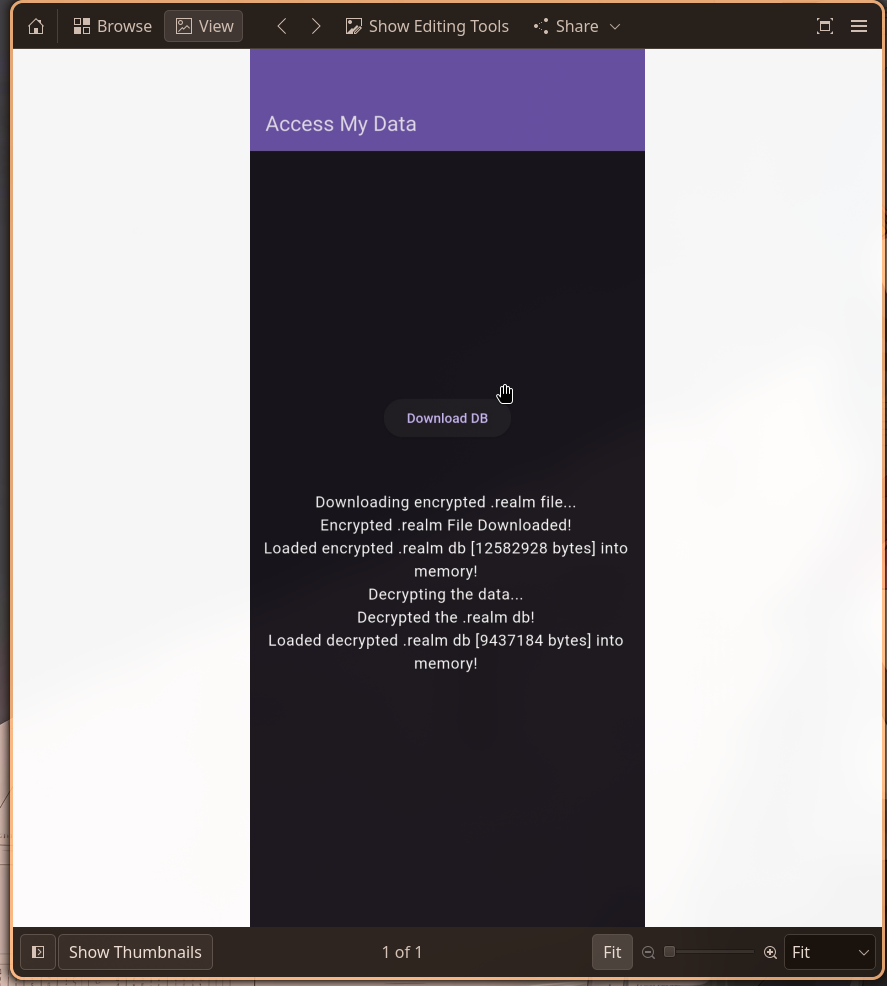
After analyzing the Android filesystem dump, we can see two
key applications in the /data/app/ directory: 1.
com.sp3p3x.notesapp - A notes application (already
analyzed for flagPart1) 2.
com.example.accessmydata - The target application
for flagPart2 maybe
The challenge description also hinted at finding deleted data from a
"realm db", and a screenshot found in
/data/system_ce/0/snapshots/ we can prettyy much confirm it's a app which uses realm db for storing data.
The Access My Data APK was found at:
/data/app/~~hvxKjg-YJ69UXXtnoCmWcw==/com.example.accessmydata-rkCVbU6Yb-jHyAaRmU8b0Q==/base.apk
Terminal output:
$ find /data/app -name "*accessmydata*" -name "*.apk"
/data/app/~~hvxKjg-YJ69UXXtnoCmWcw==/com.example.accessmydata-rkCVbU6Yb-jHyAaRmU8b0Q==/base.apk

$ ls -lh base.apk
-rw-r--r-- 1 muffin muffin 21M May 15  2025 base.apk
ImP notes - Flutter applications are unique in the Android ecosystem because they compile Dart code to native machine code using Ahead-Of-Time (AOT) compilation. This results in two important native libraries:
1. libflutter.so - The Flutter engine (shared across all Flutter apps) 2. libapp.so - The application-specific code compiled from Dart
The Dart code is embedded within libapp.so as a
snapshot, which contains: - Compiled Dart VM bytecode -
AOT-compiled native code - An Object Pool with string literals
and constants - Type information and metadata
This compilation method makes traditional APK analysis tools (like jadx or dex2jar) useless(which i wasted a lot of time on ), as there's no DEX bytecode to decompile:(
We extracted the APK to access the native libraries:
$ mkdir apk_extracted
$ unzip -q base.apk -d apk_extracted/
$ ls -lh apk_extracted/lib/arm64-v8a/
total 16M
-rw-r--r-- 1 muffin muffin 4.7M Jan  1  1981 libapp.so
-rw-r--r-- 1 muffin muffin  11M Jan  1  1981 libflutter.so
The libapp.so file (4.7 MB) contains all the
application logic we need to reverse engineer.
Blutter , a portmanteau of "B(l)utter" that plays on both
buttering and Flutter, is a reverse
engineering tool built specifically for Flutter applications in
mind. Blutter understands the internal
structure of the Dart VM snapshot embedded inside
libapp.so so it is able to parse this snapshot,
extract the object pool that contains constants, strings, and
type information, and use that data to reconstruct readable
pseudo-Dart code complete with symbols and function names. also Blutter can
generate annotated assembly listings , and even produce
Frida scripts to assist with dynamic analysis and runtime
instrumentation.(TODO for me to check this out one day )
When we run Blutter, it performs several automated steps:
$ python3 blutter.py /path/to/apk_extracted/lib/arm64-v8a /path/to/blutter_output
Blutter's first move is reading libflutter.so to figure out
exactly which Dart SDK version compiled the app cuz the
Dart VM snapshot format isn't stable across versions and we parse it with the
wrong layout and you're fucked p much . Here it pegs/pins the app at Dart 3.7.2.
Also if Blutter doesn't already have an analysis backend for that version, it builds one on the spot ,it pulls the Dart SDK source at that exact tag, compiles the VM runtime into a static library for the target arch, then links its own analysis components against it,expect several minutes of build output,it's compiling a chunk of the Dart VM from scratch
with that done, it digs into libapp.so. It locates the
embedded snapshot, pulls the object pool (constants and string literals),
reconstructs the class hierarchy, and maps out function entry points.
the output is annotated assembly, reconstructed class and function
definitions, inline constants, and control flow per Dart library,it
also spits out a Frida script if you want to instrument things at runtime.
Examining the Output Structure
$ ls -la blutter_output/
total 1524
drwxr-xr-x 1 muffin muffin     86 Dec 30 18:56 .
drwxr-x--x 1 muffin muffin    894 Dec 30 18:56 ..
drwxr-xr-x 1 muffin muffin    478 Dec 30 18:56 asm/              # Assembly listings
-rw-r--r-- 1 muffin muffin 221632 Dec 30 18:56 blutter_frida.js  # Frida script template
drwxr-xr-x 1 muffin muffin     56 Dec 30 18:56 ida_script/       # IDA Pro integration
-rw-r--r-- 1 muffin muffin 376330 Dec 30 18:56 objs.txt          # Nested object dump
-rw-r--r-- 1 muffin muffin 957372 Dec 30 18:56 pp.txt            # Complete Object Pool

$ ls blutter_output/asm/ | head -10
accessmydata/
async/
characters/
collection/
.dart_tool/
dio/
encrypt/
flutter/
...
The asm/ directory contains subdirectories for each
Dart package used in the app. Our target is
accessmydata/main.dart.
Locating the Main Application Code
$ ls -lh blutter_output/asm/accessmydata/
total 52
-rw-r--r-- 1 muffin muffin 51467 Dec 30 18:56 main.dart
The main.dart file contains 51 KB of annotated
assembly code representing the application's core logic.
Blutter generates assembly listings that interleave ARM64 assembly with Dart-level semantic comments. an example of the format:
_ _decryptData(/* No info */) {
  // addr: 0x2db4c0, size: 0x174
  // 0x2db4c0: EnterFrame
      0x2db4c0: stp             fp, lr, [SP, #-0x10]!
      0x2db4c4: mov             fp, SP
  // 0x2db4c8: AllocStack(0x30)
      0x2db4c8: sub             SP, SP, #0x30
Explanation:
-
Function signature:
_ _decryptData(/ No info /)(Dart function name) - Address and size: addr: 0x2db4c0, size: 0x174 (372 bytes)
-
Comments:
// 0x2db4c0: EnterFrame(high-level operation) -
Assembly:
0x2db4c0: stp fp, lr, [SP, #-0x10]!(actual ARM64 instruction) -
PP references:
[PP, #0x90](references to the Object Pool)
Extracting the Encryption Keys
the download URL:
    // 0x304ed8: r16 = "https://github.com/chicken-jockeyy/confidentialdb/raw/refs/heads/main/enc.bin"
    //     0x304ed8: add             x16, PP, #0xd, lsl #12  ; [pp+0xd348] "https://github..."
    /     0x304edc: ldr             x16, [x16, #0x348]
these literal strings are stored in the Object Pool (PP) and loaded into registers for use.
    // Load key part 1 into x16
    // 0x2db4f8: r16 = "04e0d32be85f3b42"
    //     0x2db4f8: add             x16, PP, #0xb, lsl #12
    /     0x2db4fc: ldr             x16, [x16, #0x5a0]

    // Load key part 2 into x30 (lr)
    // 0x2db500: r30 = "7173047a9d6574e5"
    //     0x2db500: add             lr, PP, #0xb, lsl #12
    /     0x2db504: ldr             lr, [lr, #0x5a8]

    // Push both parts onto stack
    // 0x2db508: stp             lr, x16, [SP]

    // 0x2db50c: r0 = +()
    //     Concatenate the two strings: "04e0d32be85f3b427173047a9d6574e5"
Then the code creates a reversed iterable:
    // 0x2db540: r0 = ReversedListIterable()
    //     0x2db540: bl              #0x2bee38  ; AllocateReversedListIterableStub
    // 0x2db558: r0 = join()
    //     0x2db558: bl              #0x28e4f8  ; [dart:_internal] ListIterable::join
This reverses the concatenated key string character by
character: - Original:
04e0d32be85f3b427173047a9d6574e5 - Reversed:
5e4756d9a740371724b3f58eb23d0e40
    // 0x2db564: r0 = Key()
    //     Create an encryption key object

    // 0x2db578: r0 = AES()
    //     0x2db578: bl              #0x304864  ; AllocateAESStub -> AES

    // 0x2db588: r0 = AES()
    //     0x2db588: bl              #0x2db870  ; [package:encrypt/encrypt.dart] AES::AES
    //     Initialize AES cipher with the reversed key
To find which AES mode is used, we examined the Object Pool dump:
$ grep -i "ecb\|AESMode" blutter_output/pp.txt
[pp+0xb5d8] Obj!AESMode@5032b1 : {
    off_10: "ecb"
}
[pp+0xb5f0] Map<AESMode, String>(8) {
  Obj!AESMode@503291: "CBC",
  Obj!AESMode@503271: "CFB-64",
  Obj!AESMode@503251: "CTR",
  Obj!AESMode@5032b1: "ECB",
  Obj!AESMode@503231: "OFB-64/GCTR",
  Obj!AESMode@503211: "OFB-64",
  ...
}
Cross-referencing with the assembly:
    // 0x2db880: r4 = Instance_AESMode
    //     0x2db880: add             x4, PP, #0xb, lsl #12  ; [pp+0xb5d8] Obj!AESMode@5032b1
    /     0x2db884: ldr             x4, [x4, #0x5d8]
The constant at pp+0xb5d8 is
Obj!AESMode@5032b1, which corresponds to
"ECB" mode in the enum map.
Step 4: Decryption and Base64 Decode
    // 0x2db5b8: r0 = decrypt()
    //     0x2db5b8: bl              #0x2db6a0  ; [package:encrypt/encrypt.dart] Encrypter::decrypt
    //     Decrypt the encrypted data using AES-ECB

    // 0x2db5c0: r0 = base64Decode()
    //     0x2db5c0: bl              #0x2db634  ; [dart:convert] ::base64Decode
    //     Decode the decrypted Base64 string to binary
1. Key Preparation:
   key_part1 = "04e0d32be85f3b42"
   key_part2 = "7173047a9d6574e5"
   combined = "04e0d32be85f3b427173047a9d6574e5"  (32 characters)
   reversed = "5e4756d9a740371724b3f58eb23d0e40"  (32 characters → 16 bytes UTF-8)
2. Download encrypted file:
   URL: https://github.com/chicken-jockeyy/confidentialdb/raw/refs/heads/main/enc.bin
   Size: 12,582,928 bytes
3. AES-ECB Decryption:
   Cipher: AES-128 (128-bit key = 16 bytes)
   Mode: ECB (Electronic Codebook)
   Key: "5e4756d9a7403717" + "24b3f58eb23d0e40" (16 ASCII characters)
   Input: enc.bin (raw binary data)
   Output: Base64-encoded string
4. Base64 Decoding:
   Input: Base64 string (from AES decryption)
   Output: decrypted.realm (9,437,184 bytes)
---
Part 6: Implementing the Decryptor
Downloading the Encrypted File
$ curl -L -o enc.bin "https://github.com/chicken-jockeyy/confidentialdb/raw/refs/heads/main/enc.bin"
  % Total    % Received % Xferd  Average Speed   Time    Time     Time  Current
                                 Dload  Upload   Total   Spent    Left  Speed
100 12288k  100 12288k   0     0  1988k      0   0:00:06  0:00:06 --:--:--  3087k

$ ls -lh enc.bin
-rw-r--r-- 1 muffin muffin 13M Dec 30 18:50 enc.bin

$ file enc.bin
enc.bin: data
The file is 12 MB of raw binary data (AES-encrypted).
Creating Cargo.toml for Rust Dependencies
[package]
name = "decrypt_realm"
version = "0.1.0"
edition = "2021"

[dependencies]
aes = "0.8"
base64 = "0.21"
Required crates: - aes: Provides AES block cipher implementation - base64: Handles Base64 encoding/decoding
Running the Rust Decryptor
$ cargo run --release
   Compiling aes v0.8.3
   Compiling base64 v0.21.5
   Compiling decrypt_realm v0.1.0
    Finished release [optimized] target(s) in 3.42s
     Running `target/release/decrypt_realm`


Key part 1: 04e0d32be85f3b42
Key part 2: 7173047a9d6574e5
Combined key: 04e0d32be85f3b427173047a9d6574e5
Reversed key: 5e4756d9a740371724b3f58eb23d0e40

Encrypted data size: 12582928 bytes
 AES ECB decryption complete
 Base64 decoding complete

Realm database saved as 'decrypted.realm'
 File size: 9437184 bytes (9 MB)
 File appears to be a valid Realm database
Verifying the Decrypted File
$ ls -lh decrypted.realm
-rw-r--r-- 1 muffin muffin 9.0M Dec 30 19:15 decrypted.realm

$ file decrypted.realm
decrypted.realm: data

$ hexdump -C decrypted.realm | head -20
00000000  00 00 00 00 00 00 00 00  00 00 00 00 00 00 00 00  |................|
*
00000020  54 4c 44 42 00 00 00 00  0f 72 65 61 6c 6d 5f 76  |TLDB.....realm_v|
00000030  65 72 73 69 6f 6e 00 00  14 00 00 00 01 00 00 00  |ersion..........|
Why the Key is Reversed
Looking at the Dart code pattern:
String keyPart1 = "04e0d32be85f3b42";
String keyPart2 = "7173047a9d6574e5";
String combined = keyPart1 + keyPart2;
String reversed = combined.split('').reversed.join('');
The reversed key 5e4756d9a740371724b3f58eb23d0e40 is exactly 32 ASCII
characters. As UTF-8 bytes, that's lowkey a 128-bit AES key
with our Python decryption script complete ,lemme try to decrypt it
$ python3 decrypt_realm.py
Realm database saved as 'decrypted.realm'
File size: 9437184 bytes
Verification of the decrypted file:
$ ls -lh decrypted.realm
-rw-r--r-- 1 muffin muffin 9.0M Dec 30 19:21 decrypted.realm

$ file decrypted.realm
decrypted.realm: data

$ hexdump -C decrypted.realm | head -10
00000000  78 96 88 00 00 00 00 00  c8 36 88 00 00 00 00 00  |x........6......|
00000010  54 2d 44 42 09 09 00 00  41 41 41 41 0e 00 00 05  |T-DB....AAAA....|
00000020  70 6b 00 00 00 00 00 00  00 00 00 00 00 00 00 00  |pk..............|
00000030  00 00 00 00 00 00 00 00  00 00 00 00 00 00 00 1d  |................|
00000040  6d 65 74 61 64 61 74 61  00 00 00 00 00 00 00 00  |metadata........|
00000050  00 00 00 00 00 00 00 00  00 00 00 00 00 00 00 17  |................|
00000060  63 6c 61 73 73 5f 52 65  61 6c 6d 54 65 73 74 43  |class_RealmTestC|
00000070  6c 61 73 73 30 00 00 00  00 00 00 00 00 00 00 0a  |lass0...........|
00000080  63 6c 61 73 73 5f 52 65  61 6c 6d 54 65 73 74 43  |class_RealmTestC|
00000090  6c 61 73 73 31 00 00 00  00 00 00 00 00 00 00 0a  |lass1...........|
few things to note from the hex dump:
- Bytes 0x10–0x13:
54 2d 44 42= "T-DB" (Realm magic header, confirming decryption succeeded) - Bytes 0x14–0x17:
41 41 41 41= "AAAA" (marks unused/free regions) - Offset 0x40: "metadata" (database metadata block)
- Offset 0x60: "class_RealmTestClass0" (first schema class)
- Offset 0x80: "class_RealmTestClass1" (second schema class)
before going ballsdeep , a little intro to realeam database working internals , that i got to know after reading some chinneese papers on forensics research (never reccomend)
Realm database architecture
Realm is a mobile-first database built for iOS and Android, it stores data as objects directly in a custom binary format. A few properties that matter for forensics
- Object-based model: records are objects, not table rows
- Custom binary format: no SQL layer, parsed with knowledge of the spec
- MVCC (Multi-Version Concurrency Control): multiple versions of data coexist
- Zero-copy architecture: the database file is memory-mapped directly from disk
why doess deleted data sticks around :pepe shock ?
When you delete a record in Realm, it doesn't get wiped the database just stops pointing to it. A new version of the state is written, and the old bytes sit in what's now "unused" space, waiting to be overwritten. If garbage collection hasn't run (and it often hasn't), those bytes are still fully intact on disk.Phew and good for us
To pull deleted records out, we use realm_recover. The prior research
section below goes deeper, but the short version is: Realm doesn't erase deleted
data, it just stops referencing it. realm_recover knows the binary
layout well enough to scan those unreferenced regions and reconstruct objects from
raw bytes the same technique used in Android forensics to recover data i think?
References
- Smart Techniques to Extract the Deleted Data From the Android Application
https://www.sciencedirect.com/science/article/abs/pii/S2666281722000221
- Stack Overflow discussion on restoring deleted Realm objects
https://stackoverflow.com/questions/52384845/how-to-restore-an-item-deleted-from-realm
- Smart Techniques to Extract the Deleted Data From the Android Application (Academia.edu)
$ cd /tmp
$ git clone https://github.com/hyuunnn/realm_recover.git
Cloning into 'realm_recover'...
remote: Enumerating objects: 84, done.
remote: Total 84 (delta 0), reused 0 (delta 0), pack-reused 84
Receiving objects: 100% (84/84), 27.13 KiB | 1.51 MiB/s, done.
Resolving deltas: 100% (42/42), done.

$ ls /tmp/realm_recover/
LICENSE  objects.py  README.md  realm_recover.py  sample  util.py
The repo has four files worth knowing:
- realm_recover.py: the main script you run
- objects.py: handles Realm object parsing
- util.py: binary analysis helpers
- sample/: a test database to try it on before touching your evidence
Running the Realm Recovery Tool
Execute the recovery tool on our decrypted realm database:
$ python3 /tmp/realm_recover/realm_recover.py --file decrypted.realm
[Tool runs silently, generating output files]
The tool doesn't produce console output but generates several analysis files:
$ ls -lh *.txt
-rw-r--r-- 1 muffin muffin    1705 Dec 30 19:23 compare_objects.txt
-rw-r--r-- 1 muffin muffin 1033382 Dec 30 19:23 data_storages.txt
-rw-r--r-- 1 muffin muffin 1798075 Dec 30 19:23 scan_all_objects.txt
-rw-r--r-- 1 muffin muffin 1117764 Dec 30 19:23 scan_unused_objects.txt
Understanding the output files
Four files got generated
- scan_all_objects.txt (1.8 MB) every object in the database, active or deleted, sorted by offset and type
- scan_unused_objects.txt (1.1 MB) objects no longer referenced by any active tree root, i.e. the deleted/orphaned ones. This is what we want gng
- data_storages.txt (1.0 MB) raw binary dumps of storage regions
- compare_objects.txt (1.7 KB) diff between TreeRootOffset01 and TreeRootOffset02, showing what changed between versions
The challenge description states the flag is in a "string which
was modified and then deleted from the realm db". This means we
need to search scan_unused_objects.txt.
Search for UUID-pattern strings (the typical format for test data in Realm databases):
$ grep -E "[0-9A-F]{8}-[0-9A-Z]{4}-[0-9A-Z]{4}-[0-9A-Z]{4}-[0-9A-Z]{12}" scan_unused_objects.txt
The pattern matches standard UUID format (8-4-4-4-12). Note that
[0-9A-Z] is intentionally broader than pure hex the flag parts
use characters outside the normal hex range, so a strict [0-9A-F]
would miss them.
Result (truncated for clarity):
Offset: 0x800000, Type: 0x11, Count: 534043, Object: [
  ...
  b'$97990266-4B4D-4306-A1EB-0FA8B4025844\x06\x04\x02',
  b'$48E1F6A5-C826-4244-B1CF-008E451606F3\r\x01\x01\x01',
  ...
  b'$5P0BF5BC-5AA1-4790-A05F-A2RDCBALDB49\x06\x04\x02\x03',
  ...
]
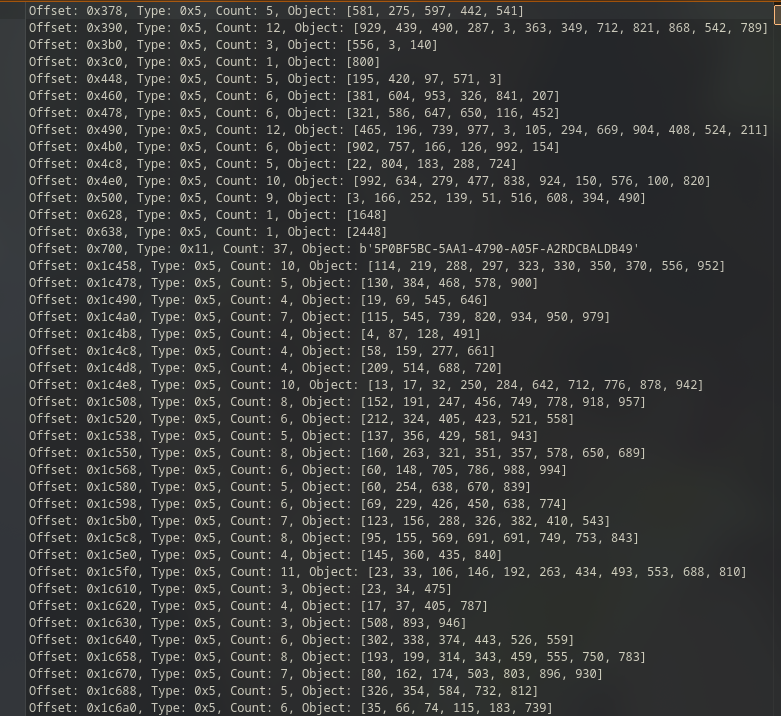
Among hundreds of valid UUIDs, one stands out:
5P0BF5BC-5AA1-4790-A05F-A2RDCBALDB49
This is flagPart2.
so why did this work? well think about what mvcc actually does actually,instead of
overwriting a record in place, realm writes a new version and leaves the
old one sitting in what's now "unreferenced" space. The active tree no
longer points to it,but the bytes are still there on disk.
realm_recover scans those unreferenced regions, and because
it knows Realm's binary object layout, it can parse those leftover
structures and pull out meaningful records.
in this case the deleted UUID was sitting at offset 0x800000
in a region marked unused. The object had been cut from the active tree,
but nothing had overwritten it yet, so its binary representation was
completely intact. No garbage collection, no overwrite, clean recovery.
Complete Flag:
bi0sctf{w311_7h47_p4r7_w45_345y_5P0BF5BC-5AA1-4790-A05F-A2RDCBALDB49}
 Start
Start